
You are using an out of date browser. It may not display this or other websites correctly.
You should upgrade or use an alternative browser.
You should upgrade or use an alternative browser.
LCD or LED Monitors
- Thread starter ShawnQuah
- Start date
is there a coupon for U2410?
coupon code G1?5P3GJLH?LCF $70 discount.

geekbrains
Senior Member
most of the newer screens are in fact IPS panels now. samsung, LG, phillips, etc..
but not all IPS screens are created equal tho. a better choice will be the dell 2410 which is both affordable and good.
Unfortunately you're wrong on this bro. IPS is a patented technology only a few panel makers can produce this such as Hitachi, NEC & LG Display (Formerly LG Philips LCD). As Samsung bets on their VA (Vertical Alignment) variants such as S-PVA they don't really manufacture any IPS based panels.
In the market, you can find Philips, DELL, HP selling IPS and LG indeed sells some high end IPS on their own brand.
Beware of E-IPS as it's a cheaper alternative for expensive IPS panels and it competes with TN on Price and Performance.

yup i stand corrected.Unfortunately you're wrong on this bro. IPS is a patented technology only a few panel makers can produce this such as Hitachi, NEC & LG Display (Formerly LG Philips LCD). As Samsung bets on their VA (Vertical Alignment) variants such as S-PVA they don't really manufacture any IPS based panels.
In the market, you can find Philips, DELL, HP selling IPS and LG indeed sells some high end IPS on their own brand.
Beware of E-IPS as it's a cheaper alternative for expensive IPS panels and it competes with TN on Price and Performance.
after a bit of looking around, i was surprised that samsung in deed did not have IPS technology.
geekbrains
Senior Member
just some FYIs:
- technically, LED screens are actually screens composed of red, green, and blue LEDs, with a triplet of those forming one pixel... no LCD panel is involved... typically these are very large outdoor screens with high brightness, many of which are for advertising purposes, for distant viewing... when standing close, one can actually see with the naked eye the individual LEDs...
- what is normally in LCD monitors and TVs should be called LED-backlit LCD screens... as opposed to those backlit by flourescent tubes (CCFL)... that is, the LEDs are used as the source of light shinning through the LCD panel to form the image...
- LED-backlit does not automatically mean the colour is superior to CCFL-backlit monitors... some of those use "white" LEDs, which typically are blue LEDs with a yellow tint applied, and these tend not to be as good as quality CCFL-backlit monitors... the good LED-backlit ones are what are those that have red, green, and blue LEDs forming the backlight, and they are normally called RGBLED-backlit monitors...
-Samsung does not produce IPS screens... they produce their proprietary PVA screens, as well as TN screens...
Pretty Good explanation :thumbsup:
Even the LED backlight is subdivided into many as Constant Matrix, Edge Lit, Edge Lit with Reflector Matrix, RGBLED and various subtypes of RGB LED.
Further not all White LEDs are Blue LEDs with Yellow Phosphor coating. Pure White LEDs are expensive to manufacture and people settle for these Blue LEDs with Yellow Phosphor to meet the price / performance ratio.
Though RGBLED offers excellent color gamut, it has its own downsides as well such as white point shift. It's predominant in an RGB LED array than a White LED array where it happens at a minimal rate.
geekbrains
Senior Member
I have the U2410 and U2311H compare side by side, to my surprise--or horror cause U2410 cost more than double--the U2311H actually offer more natural color and completely free of pink tint. U2311H is using default Standard color mode and U2410 is using Adobe RGB. other modes are even worst. so much for the factory color calibrated cert. U2410 at its perfect condition should be better but seems their QC was taking a holiday as there are too many reports of pink tint issue that can't be solved.
I do not have a color calibrator but with my eyes trained by many top CRT--Sony G520, NEC FP2141, Mitsubishi diamondtron, etc and the color chart beside the monitors, the color U2311H just looks more natural or neutral.
U2311H's dull black frame with unsophisticated square base, no 1:1 pixel mapping or aspect ratio scaling, not the smoothest text rendering, average contrast ratio--compare to VA panel but at a price of $279(before 27 may), these are just nitpicking. though I would hope Dell could introduce a budget IPS monitor with a "proper" 16:10 aspect ratio cause I really hate the 16:9 aspect ratio. :nono:
I understand your feelings
 But E-IPS suffers from the same downsides of TN such as Poor Viewing Angle and Color Shift. In my explanation E-IPS is not Enhanced IPS it is Economic IPS
 coupon code G1?5P3GJLH?LCF $70 discount.
thank you.
I understand your feelings
I beg to differ and I wonder if you even see a monitor with e-IPS panel? :dunno: e-IPS panel doesn't have any downside share with TN. it does have "glow" effect when viewing darker image from the sides but that's not the same as TN which just destroy the image.
FlatpanelsHD reviews on U2311H.
Viewing from the side, pic taken from the review site:
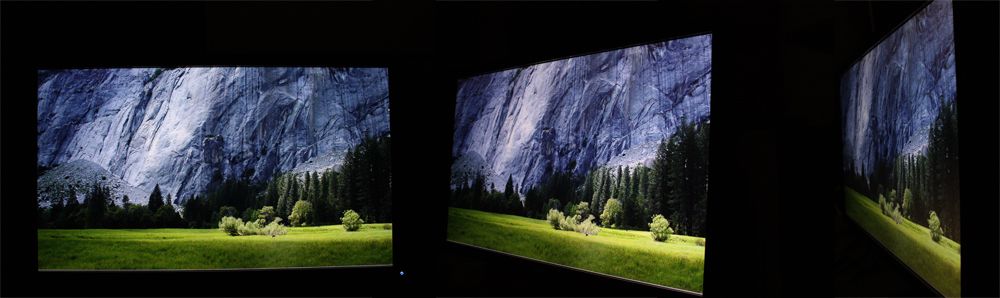
for comparison from TN camp, an similar 23" FullHD with LED backlit, the Samsung XL2370--S$450
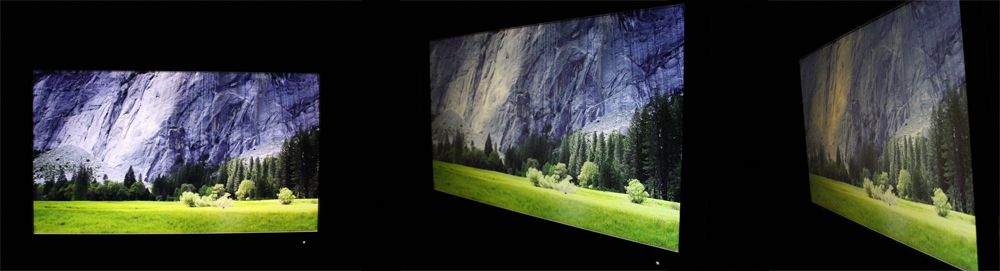
Dell 2209WA review by PRAD
NEC EA231WMi Review by FlatpanelsHD, possibly using the same panel as U2311H.
the e-IPS was never meant to compete with S-IPS/H-IPS, as we can clearly see from the cost and market segment it is competing. basically, e-IPS is a simpler, less complex structured H-IPS, to cut cost.
Last edited:
geekbrains
Senior Member
I beg to differ and I wonder if you even see a monitor with e-IPS panel? :dunno: e-IPS panel doesn't have any downside share with TN. it does have "glow" effect when viewing darker image from the sides but that's not the same as TN which just destroy the image.
FlatpanelsHD reviews on U2311H.
Viewing from the side, pic taken from the review site:
for comparison from TN camp, an similar 23" FullHD with LED backlit, the Samsung XL2370--S$450
Dell 2209WA review by PRAD
NEC EA231WMi Review by FlatpanelsHD, possibly using the same panel as U2311H.
the e-IPS was never meant to compete with S-IPS/H-IPS, as we can clearly see from the cost and market segment it is competing. basically, e-IPS is a simpler, less complex structured H-IPS, to cut cost.
I don't understand what you're trying to say here..You mean to say that these pics do not suffer any color shifts or provides better viewing angle?
PS: I do manage core design and serviceability engineering as a part of my job scope
I don't understand what you're trying to say here..You mean to say that these pics do not suffer any color shifts or provides better viewing angle?
PS: I do manage core design and serviceability engineering as a part of my job scope
well, I too don't understand why you said e-IPS suffer the same poor viewing angle as the TN? as proven by online reviews and many local user, e-IPS do not have poor viewing angle. and the actual pics provide hard proof.
as for color/contrast shift, it is the nature of LCD tech, none of them are free of this issue. its just the matter of how much--worst like the TN or reasonably good enough for IPS.
as a person in your line of field, you should know that, don't you?

geekbrains
Senior Member
well, I too don't understand why you said e-IPS suffer the same poor viewing angle as the TN? as proven by online reviews and many local user, e-IPS do not have poor viewing angle. and the actual pics provide hard proof.
as for color/contrast shift, it is the nature of LCD tech, none of them are free of this issue. its just the matter of how much--worst like the TN or reasonably good enough for IPS.
as a person in your line of field, you should know that, don't you?
Quoting from the same review site where you referenced.
Change in contrast is another story, however. From even small angles U2311H begin to loose contrast and this is very visible on dark colors and black. Below you can see a picture U2311H with a black background from an angle. Notice that the color is changing and becoming brighter and tinted.
This phenomenon is not unusual with IPS panels and some IPS panels have purple tinting instead but on U2410 that I have standing next to U2311H theres no such serious contrast issues.
If losing contrast at varying angles doesn't mean limited viewing angles to you, I'll remain dumb as you think..
http://www.tftcentral.co.uk/articles/content/panel_technologies_content.htm#e-ips
geekbrains
Senior Member
I stand corrected. All my earlier references to E-IPS were supposed to be e-IPS. I didn't bring any real E-IPS or E-S-IPS in this topic.
sshayndell12
New Member
Keep in mind that the 22" LED LCD is only 1680x1050.
I've been leaning towards picking up an LED LCD myself, but the $120 premium for the 24" 1080p is a bit excessive...
____________________________________________________
Web Design Birmingham
Website Design Birmingham
I've been leaning towards picking up an LED LCD myself, but the $120 premium for the 24" 1080p is a bit excessive...
____________________________________________________
Web Design Birmingham
Website Design Birmingham
Quoting from the same review site where you referenced.
If losing contrast at varying angles doesn't mean limited viewing angles to you, I'll remain dumb as you think..
http://www.tftcentral.co.uk/articles/content/panel_technologies_content.htm#e-ips
As I said earlier, all LCD loose contrast and/or Color and even Gamma for the case of TN when view from an angle. the e-IPS panel used on U2311H suffer mainly the "glowing effect" when viewing darker image from the sides. but it isn't poor in any case, not even distracting to me who still prefer CRT and Plasma.
I have both U2410 and U2311H, to be honest, I find the viewing of U2311H better than U2410 which suffer tinting issue.
All H/S-IPS panel loose contrast when view from sides:
The Hi end NEC 2490WUXi
The graphic professioner choice Eizo CG243W
The Dell U2711 that receive recommendation everywhere.
U2711, picture taken from FlatpanelsHD:
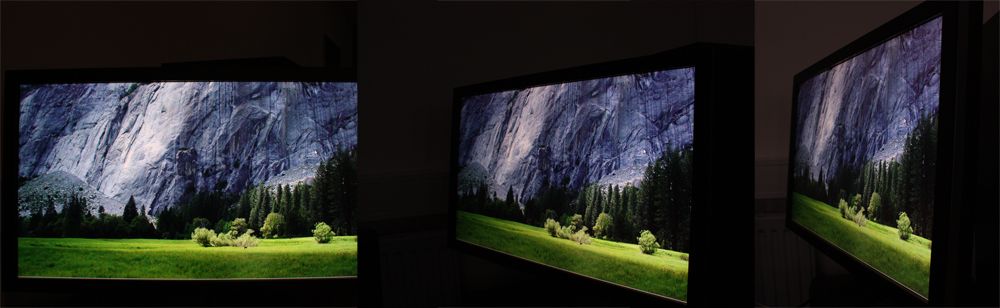
U2311H, also review by FlatpanelsHD:
I fail to see any visible different between the 2 pictures.
Keep in mind that the 22" LED LCD is only 1680x1050.
I've been leaning towards picking up an LED LCD myself, but the $120 premium for the 24" 1080p is a bit excessive...
what 22" were you referring to? the Samsung XL2370 is a 1080p monitor.
Although it might hurt the resale value of my U2410, I would like to warn the potential buyer against buying it. there are many report of pink tint issue.

Hi All
Can anyone advise is the new era of LED monitors good for photo editing?
I am intending to replace my good and faithful CRT monitor to one that "takes up less space"
I suggest that you get the Dell ST2410. It is much cheaper and good enough for photo editing.
It seems that I also suffer from the same prob. It does not make a diff if I use sRGB or Adobe RGB. It seems that sRGB is worse.what 22" were you referring to? the Samsung XL2370 is a 1080p monitor.
Although it might hurt the resale value of my U2410, I would like to warn the potential buyer against buying it. there are many report of pink tint issue.
What I did to alleviate the problem is to reset colour settings, leaving the preset as Adobe RGB. It kinda clear the pinkish tint. Otherwise, I have to leave it at Standard or Gaming (Too bright for me) mode.
But I guess I can leave with it cos it is much better than my previous normal monitor, anyway this is my first IPS panel so I got no comparison.
It seems that I also suffer from the same prob. It does not make a diff if I use sRGB or Adobe RGB. It seems that sRGB is worse.
What I did to alleviate the problem is to reset colour settings, leaving the preset as Adobe RGB. It kinda clear the pinkish tint. Otherwise, I have to leave it at Standard or Gaming (Too bright for me) mode.
But I guess I can leave with it cos it is much better than my previous normal monitor, anyway this is my first IPS panel so I got no comparison.
You need to calibrate the monitor. This required some panadol and patience.
Similar threads

- Replies
- 0
- Views
- 1K
- Replies
- 0
- Views
- 3K
- Replies
- 0
- Views
- 1K
- Replies
- 0
- Views
- 2K